
Similar games
More ThunderCats Roar Character Creator
TOP
 Pet Rescue ASMR
NEW
 Luma’s Autumn Royal Ball
NEW
 Miss Hot Mess Show
 Avatar World Create Skins and Explore
 SunnyNest Hotel
 Night Silk Dark City Fashionistas
 Royal Glow Princess Makeover
 BFF Makeover Spa and Dress Up
 Dress and Crown
 Glamour Studio
 Mermaid Muse
 1
 0
 Controls
8 plays
New games
More Super Car Parking Master
NEW
 Siren City Ambulance Game
NEW
 Blokoparkur
NEW
 Crazy Cart
NEW
 HARVESTORIA: Tractor Farming
NEW
 Obby Snow Shoveling
NEW
 Castle Story Match3!
NEW
 Animals Kart
NEW
 Mini Soccer 3D
NEW
 Ring Unhook
NEW
 Tower Craft
 Ambulance Rescue Parking Simulator
Ellie’s Velvet Glam Look
About Ellie’s Velvet Glam Look
<p>Ellie’s Velvet Glam Look lets you build an evening outfit in a pink dressing room. Ellie stands in front of the wardrobe, and the items you choose appear on her straight away. The heart-shaped Glam meter to the left shows how many parts of the outfit are filled. Try a few combinations before pressing Done so you can see how the colours and shapes look together.</p>
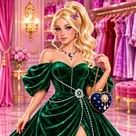
<p>Start with the dresses if you want to decide on the colour first. The wardrobe offers a pink ruffled dress, a royal blue option, and an emerald velvet gown with draped sleeves and silver trim. In the opening look, the shorter pink skirt leaves Ellie’s heels visible. Switch to the emerald gown to see how its longer skirt and wider sleeves change the balance of the outfit. The rest of your choices stay in place as you compare the two.</p>
<p>The outfit has seven parts. Below Ellie are tabs for dresses, hair, shoes, bags, head accessories, necklaces and earrings. A green tick on a tab marks a category with a selection. You can move between the tabs at any time. For example, keep the dress and change just the hair first. A high ponytail leaves the neckline easier to see, while a style that falls over a shoulder puts more attention on that side.</p>
<p>Bags are useful for adding a small bit of contrast. In one run, the dark blue heart-shaped bag with gold detailing stayed visible against the emerald velvet. Compare a bag with a simpler outline if you want the dress trim to stand out more. The same idea works with necklaces. A short necklace fits above a dress with a detailed bodice, while a dress with a simpler front gives a pendant more space.</p>
<p>The dice button gives you a surprise combination. Use it if you want a starting point, then open the tabs to make the look your own. The bin icon clears the pieces so you can start from scratch. Items marked AD open an optional ad prompt, and there are other choices in the same wardrobe that you can select directly.</p>
<p>Before you finish, glance at the meter and the green ticks to see whether you skipped a category. If the shoes are hidden by the long skirt, their tab is the quickest way to check. The camera button is there if you want to take a picture of the look, and the large pink checkmark finishes the styling session.</p>
How to play
Click or tap a wardrobe tab, choose an item, and check it on Ellie. Work through all seven tabs if you want a complete look. Press the pink checkmark to finish. The dice creates a surprise combination and the bin clears the wardrobe selections.
FAQ
What does the Glam meter count?
It shows how many of the seven outfit categories have a selection. Check the ticks beside the tabs to see which ones you have filled.
Can I change only the dress?
Yes. Open Dresses and pick a new one. The hairstyle, shoes, bag and jewellery stay in place.
What does the AD badge mean?
That item opens an optional ad prompt. Choose a tile without the badge to apply it directly.
How do I take a picture of Ellie’s outfit?
Use the camera button on the right of the wardrobe screen.