


Choose from our recommended games









































































































-

Wow Wow Wubbzy
-

Girl
-

Friday Night Funkin
-

My Little Pony
-

Cooking
-

Lego
-

Frozen
-

Puzzle
-

Cars
-

Ben 10
-

Princess
-

Kids
-

Paw Patrol
-

Hello Kitty
-

2 Player
-

Peppa Pig
-

Sofia the First
-

Minecraft
-

Five Nights at Freddy
-

Beyblade
-

All categories











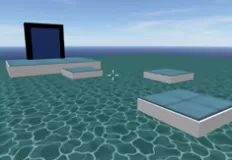












Office Knight 3D Castle Defense
 26 Mar 2026
 457
457 1
1
Play free Office Knight 3D Castle Defense - Boys Games
Office Knight 3D: Castle Defense throws you into a bizarre and action-packed adventure where an ordinary office worker becomes an unlikely hero. After falling asleep over a quarterly report, you awaken inside a mysterious fortress, armed with nothing but a weapon and a mission: survive relentless waves of magical creatures until morning. Your new “deadline” is no longer paperwork, it’s survival.
The game blends fast-paced combat with RPG progression, creating a dynamic and highly replayable experience. Each wave of enemies grows stronger and more numerous, forcing you to constantly adapt your strategy. From quick reflexes to smart positioning, every decision matters as the battlefield becomes increasingly chaotic.
As you defeat enemies, you gain experience and level up, unlocking permanent boosts to your damage and stamina while also restoring your health. This progression system ensures that every run feels rewarding, even as the difficulty ramps up. At the same time, coins dropped by defeated foes introduce a survival economy, do you save up for powerful weapons or invest in immediate upgrades like speed and healing?
Your arsenal plays a crucial role in how you approach combat. Different weapons come with unique effects that can dramatically change your playstyle. The Hammer can unleash devastating lightning strikes that hit multiple enemies, while the Golden Sword surrounds you with flames, dealing continuous bonus damage. Choosing the right weapon at the right time can mean the difference between survival and defeat.
Controls are intuitive across platforms. On desktop, use WASD to move, left mouse button to attack, Space to jump, and Shift to sprint. Swap weapons with Q, interact with the shop using E, zoom with the mouse wheel, and toggle the cursor with R. On mobile, use the left joystick to move, on-screen buttons for actions, and swipe to rotate the camera. Have fun!
How to play
WASD — Move LEFT MOUSE BUTTON — Attack Space — Jump Left Shift — Sprint (Speed up) Q — Swap weapon E — Interact (Shop) MOUSE WHEEL — Zoom (in/out) R — Toggle cursor


